Computer architecture
Exercise information-and-architecture-annex.pdf · PDF
What you will learn
- Why the first computers had to be rewired by hand for every new task
- The Von Neumann architecture: CPU, memory, I/O and the bus
- The stored-program concept, and why it changed everything
- What the Control Unit, the ALU and the registers do inside the CPU
- Why we need both RAM and disk
- The fetch → decode → execute cycle, the CPU's heartbeat
- The Harvard architecture, and the hybrid that current CPUs actually use
The Von Neumann architecture (1945)
In the 1940s, computers like ENIAC (Electronic Numerical Integrator And Computer) filled entire rooms. The creepy part: to give them a new task, engineers had to unplug and rewire the machine by hand — "programming" took days of plugging cables. The program wasn't inside the computer; it was the wiring.
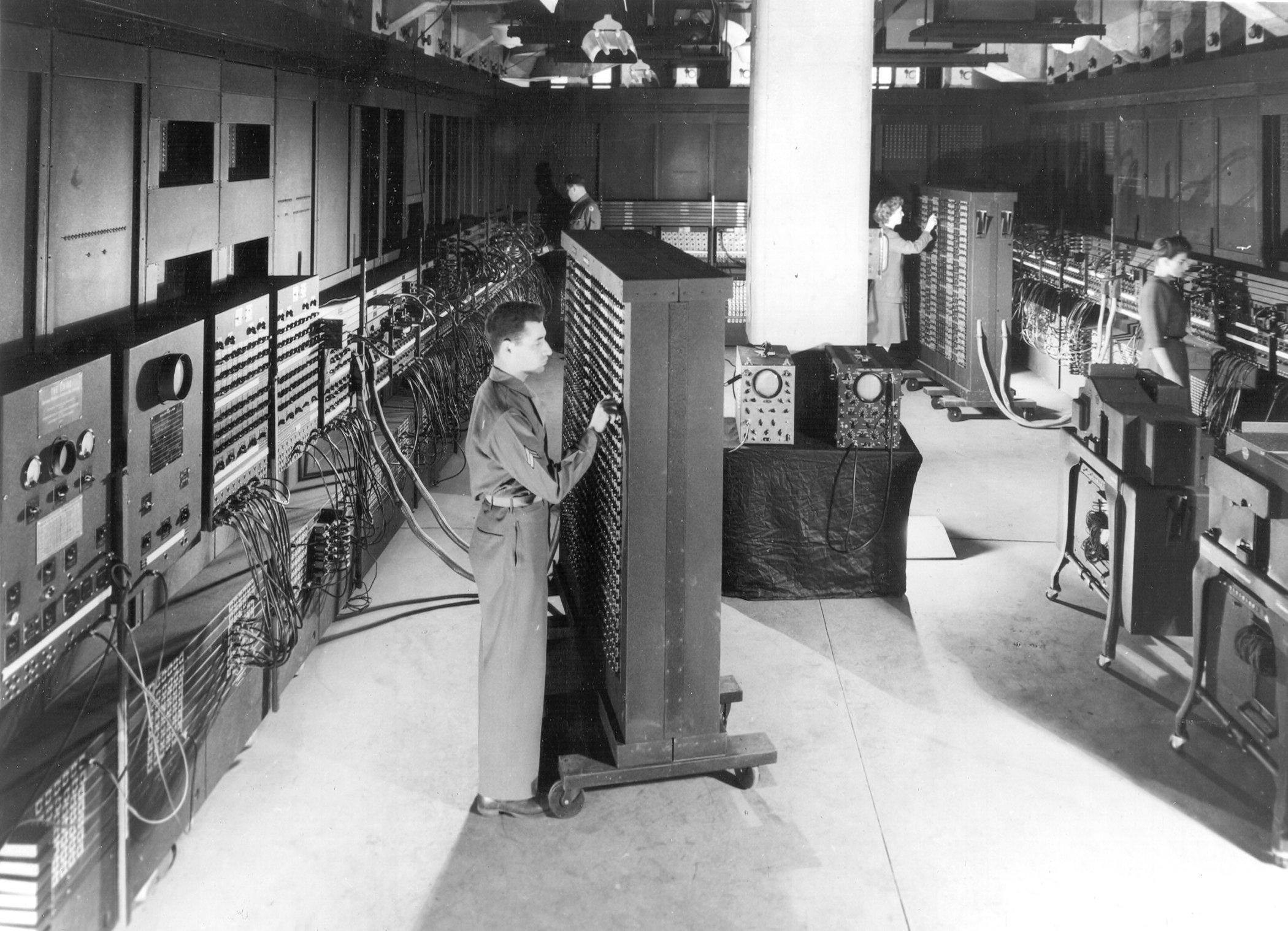
In 1945 the mathematician John von Neumann wrote down a blueprint that killed that problem. It was so good that almost every computer you'll ever touch — your phone, a car's engine computer, a data-center server — is still built exactly like this:
flowchart TB
    subgraph CPU ["CPU — Central Processing Unit (the chef)"]
        direction LR
        CU["<b>Control Unit</b><br>the head: reads the recipe,<br>orders the other parts"]
        ALU["<b>ALU</b><br>the hands: does the<br>math and the logic"]
        REG["<b>Registers</b><br>tiny ultra-fast slots for<br>the values used right now"]
        CU <--> ALU
        CU <--> REG
        ALU <--> REG
    end

    subgraph MEM ["Memory — RAM (the countertop)"]
        direction LR
        PROG["<b>Program</b><br>the recipe:<br>instructions, as bits"]
        DATA["<b>Data</b><br>the ingredients:<br>numbers, text... as bits"]
    end

    subgraph IO ["I/O devices (doors to the world)"]
        direction LR
        IN["<b>Input</b><br>keyboard, mouse, mic,<br>network, sensors..."]
        OUT["<b>Output</b><br>screen, speakers,<br>network, motors..."]
    end

    BUS(["<b>BUS</b><br>the shared corridor:<br>everything travels through here"])

    CPU <-->|"fetch instructions,<br>read and write data"| BUS
    MEM <-->|"program and data"| BUS
    BUS <-->|"information in,<br>information out"| IO
Four ingredients, one idea holding it together:
1. The stored-program concept — the revolution
The program and its data live together in the same memory, and both are stored as bits — the program is just data that the CPU treats as instructions.
Think about how huge that is:
- Before: new task = days of rewiring.
- After: new task = load new instructions into memory. Takes seconds.
- This is why you can install an app today and run it tomorrow, and why a virus (a program!) can end up in the same memory as your photos. One memory, one format: bits.
2. The CPU — the chef
The Central Processing Unit is the part that actually runs the program. It is not one thing; inside it live three workers:
| Part | What it does | In the kitchen |
|---|---|---|
| Control Unit (CU) | Reads the next instruction, figures out what it means, tells everyone what to do | The chef's head: reads the recipe, gives the orders |
| ALU (Arithmetic Logic Unit) | Does the real work: add, subtract, compare, AND, OR... | The chef's hands: the actual cutting and mixing |
| Registers | Tiny, ultra-fast storage slots for the values being used at this exact moment | The countertop within arm's reach |
Registers matter more than they look. The ALU can only work on values that are right there, so the CU constantly shuffles data: memory → register, register → ALU, result → register, register → memory. Fast shuffling is everything.
3. Memory — where the recipe and the ingredients live
The program and its data sit in the same memory as plain bits. There are two main kinds, and you need both:
- RAM (Random Access Memory) — the workspace. Whatever is running right now lives here. "Random access" means you can jump to any position instantly — like picking any song from a playlist, not fast-forwarding a cassette. Volatile: cut the power and everything vanishes.
- Disk (SSD/HDD) — the pantry. Huge, slower, non-volatile: your files survive power cuts.
| RAM | Disk | |
|---|---|---|
| Role | Workspace for what runs now | Archive for everything else |
| Power off | loses everything | keeps data |
| Speed | Insanely fast | Much slower |
| Size | Small (GBs) | Huge (TBs) |
Why not skip RAM and run programs straight from the disk? Speed. The disk is thousands of times slower — the CPU would spend its life waiting. RAM is the fast staging area; the disk is the archive behind it.
4. I/O — the doors to the outside world
A computer that talks to nobody is a brick. Input devices bring information in (keyboard, mouse, microphone, network card, sensors); output devices send results out (screen, speakers, motors). Some doors swing both ways — a network card or a touchscreen is input and output.
5. The bus — the corridor connecting every room
All the parts above are connected by the bus: a shared set of wires. Roughly three kinds of traffic travel on it:
- Data — what is being moved (a number, a letter, an instruction).
- Address — where it goes (every byte in memory has a number, like a street address).
- Control — who may talk and in which direction (reading or writing?).
Everything rides the same corridor — which is brilliant for simplicity, and also its weak spot:
The one-corridor problem
If the CPU is much faster than RAM (it always is), it ends up waiting at the bus for data to arrive. This is called the Von Neumann bottleneck. Modern CPUs fight it with small, ultra-fast memory built next to the CPU, called cache — more on that later in the course.
The Harvard architecture
Around the same time, the Harvard Mark I (1944) took a different path: it read its instructions from a punched paper tape and kept its data somewhere else. That idea is the Harvard architecture: program and data live in separate memories, each with its own bus.
flowchart LR
    PM["<b>Program memory</b><br>instructions only"] <-->|"instruction bus"| CPU["<b>CPU</b>"]
CPU <-->|"data bus"| DM["<b>Data memory</b><br>data only"]- Two corridors: the CPU can fetch the next instruction and read data at the same time — no single bottleneck.
- Safer: data can never be executed by accident, and a program cannot overwrite itself.
- Rigid: the split is fixed. Free space in data memory cannot be used for a bigger program, and vice versa.
- More hardware: two memories, two buses, more wires.
You still find pure Harvard in microcontrollers and DSPs (digital signal processors). The Arduino Uno's chip keeps the program in 32 KB of flash and the data in 2 KB of RAM — two separate memories.
The modified Harvard architecture (Your current CPU)
Neither of them, and both. Every current CPU — Intel, AMD, Apple M, the one in your phone — uses a modified Harvard architecture, a hybrid:
- Outside the chip, it is Von Neumann: one RAM, one address space, programs and data mixed as bits. Installing an app is still just copying bits into memory.
- Inside the chip, it is Harvard: the fastest cache level (L1) is split in two — L1i for instructions and L1d for data — each with its own path, so fetching and reading data don't wait for each other.
- It borrows Harvard's safety: memory pages can be marked as non-executable (the NX bit), so the CPU refuses to run bytes that are supposed to be data. That blocks a whole family of attacks.
| Von Neumann | Harvard | Modified Harvard | |
|---|---|---|---|
| Program and data | Same memory | Separate memories | Same RAM, split L1 cache |
| Buses | One shared | One each | Shared outside, split inside |
| Bottleneck | Yes | No | Reduced by cache |
| Flexible memory use | Yes | No | Yes |
| Where | Classic textbook model | Microcontrollers, DSPs | Laptops, phones, servers |
Try it on Linux: lscpu | grep L1 shows the two halves of your L1 cache (L1d and L1i).
The heartbeat: fetch → decode → execute
So what does the CPU do all day? One loop, forever:
flowchart LR
    A["<b>1 · FETCH</b><br>get the next instruction<br>from RAM"] --> B["<b>2 · DECODE</b><br>understand what<br>it is asking for"] --> C["<b>3 · EXECUTE</b><br>actually do it:<br>add, compare, jump..."]
C --> A- Fetch — the Control Unit asks RAM for the next instruction (it keeps a pointer saying where the next one is).
- Decode — the instruction is just bits; the CU translates them into a concrete action: "add these two numbers".
- Execute — the action happens (usually in the ALU), the result is stored, and the pointer moves to the next instruction.
A "3 GHz" CPU repeats this loop about 3 billion times per second. Every app you use — games, browsers, WhatsApp — is ultimately this tiny loop, running very, very fast.
Watch one instruction go through the machine
1. LOAD  5        ← grab the number 5 from RAM
2. ADD   3        ← add 3 to it
3. STORE result   ← write the answer back to RAM
4. PRINT result   ← send it out to the screen
Follow line 2 (ADD 3) through the diagram above:
- Fetch: CU asks RAM, over the bus, for instruction #2. RAM sends the bits; the CU parks them in a register.
- Decode: the CU recognizes "this is an ADD". It arranges for the value in the register (5) to meet the value 3.
- Execute: the ALU computes
5 + 3 = 8and leaves the result in a register. The loop restarts for instruction #3, which ships the 8 back to RAM over the bus.
A program that adds 5 + 3 might look like this. Press Next to run it one step at a time and watch which part of the machine is working:
Four instructions in, and the machine has already done fetch–decode–execute four times. Now multiply by three billion per second — that's your phone.
The kitchen analogy
| Computer | Kitchen |
|---|---|
| Program (in memory) | The recipe |
| Data (in memory) | The ingredients |
| CPU | The chef, following the recipe step by step |
| Control Unit | The chef's head: reads, understands, orders |
| ALU | The chef's hands: cuts and mixes |
| Registers | The countertop within arm's reach |
| RAM | The countertop: fast to reach, but small |
| Disk | The pantry: slower, but huge |
| I/O | Doors and windows: things in, things out |
| Bus | The corridor connecting every room |
RAM vs. disk: aren't they both "memory"?
Yes — but they play completely different roles:
| RAM | Disk (HDD/SSD) | |
|---|---|---|
| Role | Workspace for what is running now | Archive for everything else |
| Volatile? | loses everything at power off | keeps data |
| Speed | Insanely fast | Much slower |
| Capacity | Small & expensive (GBs) | Huge & cheap (TBs) |
If 1 CPU cycle lasted 1 second...
...then, in your time scale:
| Action | Real time | Your scale |
|---|---|---|
| 1 CPU cycle | ~0.3 ns | 1 second |
| Read from RAM | ~100 ns | ~5 minutes |
| Read from SSD | ~100 µs | ~3.5 days |
| HDD seek | ~10 ms | ~1 year |
| Internet round-trip | ~30 ms | ~3 years |
This is why the CPU lives next to the RAM, and why copying files "takes ages". Speed differences in hardware are enormous.
Key takeaways
- Before 1945, "programming" a computer like ENIAC meant rewiring it by hand.
- The Von Neumann architecture (1945) is the blueprint almost every machine still uses: CPU + memory + I/O, connected by a bus.
- The revolution was the stored-program concept: the program lives in the same memory as the data, both as bits. No more rewiring.
- Inside the CPU: Control Unit (decides), ALU (computes), registers (hold what's in use right now).
- RAM = fast, small, volatile workspace. Disk = slow, huge, permanent archive. You need both.
- The CPU's whole life is fetch → decode → execute, billions of times per second.
- One shared bus means the CPU waits for memory: the Von Neumann bottleneck.
- Harvard keeps program and data in separate memories; current CPUs use a modified Harvard: one RAM outside, split L1 cache inside.
Quick check
1. What was revolutionary about the stored-program concept?
- The program is stored in memory, like any other data
- Programs became faster after it
- The machine kept the program and the data in separate places
- The machine could only run one program
Before the stored-program concept, "reprogramming" meant rewiring the machine by hand. After it, running a new task just meant loading new instructions into memory.
2. Which part of the CPU actually adds two numbers?
- The ALU
- The Control Unit
- The registers
- The bus
The Control Unit reads and orders, the registers hold the values, but the math and the logic happen in the ALU (Arithmetic Logic Unit) — the chef's hands.
3. What are the three steps of the CPU cycle, in order?
- Fetch, decode, execute
- Store, transform, transfer
- Decode, fetch, execute
- Boot, run, shutdown
Fetch: the CPU grabs the next instruction from RAM. Decode: it works out what the instruction asks. Execute: it does it. Then repeat — forever.
4. Why does the CPU need RAM if the disk also stores the program?
- RAM is thousands of times faster than the disk
- RAM stores files permanently, the disk does not
- The CPU cannot read the disk at all
- RAM is cheaper per gigabyte than the disk
The disk is thousands of times slower than RAM. Programs are copied from disk into RAM so the CPU can fetch instructions without waiting an eternity at every step.
5. What is the Von Neumann bottleneck?
- The CPU waits because everything travels over one shared bus
- The disk is full and the computer slows down
- The CPU overheats and lowers its speed
- Too many programs are open at the same time
Instructions and data share the same corridor, and memory is slower than the CPU. Cache — and splitting it in two, like Harvard — is how modern CPUs fight it.
6. Select the two that are true about a current laptop CPU.
- Programs and data share the same RAM, like Von Neumann
- The L1 cache is split into instructions and data, like Harvard
- Programs and data live in separate RAM modules
- It is a pure Harvard machine, like a microcontroller
Current CPUs use a modified Harvard architecture: Von Neumann outside (one RAM), Harvard inside (split L1 cache).